
Parent Portal
Parenta Group LtdParenting
3.48.00 Reviews
- Version
- 8.748.0
- Installs
- 50.00K
- Age Rating
- Everyone
Screenshots
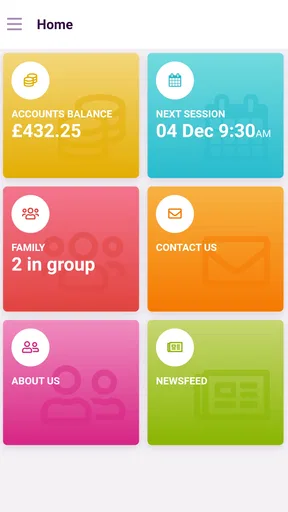
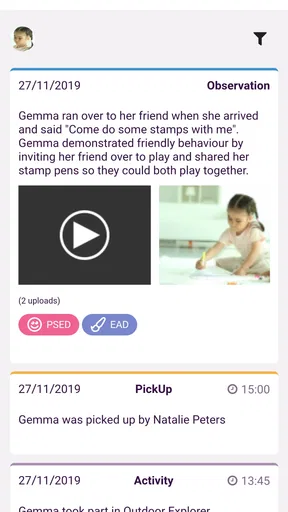
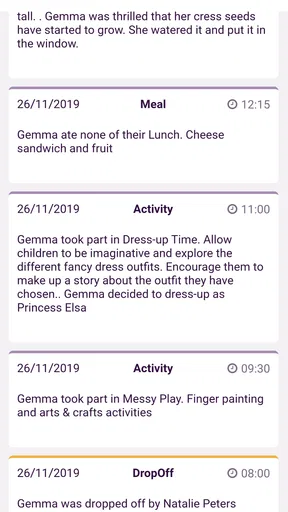

Our Review of Parent Portal
 Analysis by Appyee
Parent Portal is the kind of parenting app that makes the most sense when you already need to stay connected to a childcare setting. Rather than trying to become a complete family organizer, it focuses on giving parents a direct, secure way to view information related to their child. In my experience, that narrower purpose is both its biggest strength and the reason some families may find it too limited.
Created by Parenta Group Ltd, this free parenting app is aimed at families whose childcare provider uses the Parenta system. The central idea is simple: instead of relying entirely on paper notes, phone calls, or messages passed along at pickup, parents can use one place to access their child’s information. Its value depends heavily on the connection between the parent and the childcare provider, so it is best understood as a communication and information-access tool rather than a general-purpose parenting companion.
How Parent Portal fits into everyday childcare
The first thing I noticed about Parent Portal is that it is built around access rather than entertainment. There are no distracting social features or broad lifestyle tools competing for attention. The app exists to help parents check information connected with their child’s care, which gives it a practical role in the daily routine.
A realistic example would be a parent finishing work later than usual and wanting to review the latest information before collecting a child. Instead of searching through messages or trying to remember what was said during a rushed handover, the parent can open the portal and check the information available through the childcare setting. That small change can reduce uncertainty, especially on busy days when several details need to be remembered.
I also see value for parents who share childcare responsibilities. When two adults cannot both attend every conversation at drop-off or pickup, having access through the same parent-facing service can make it easier for each person to stay informed. It does not replace speaking directly with staff when something is urgent or sensitive, but it can reduce the everyday gap between what happens at the setting and what a parent knows at home.
The app’s store summary describes secure, direct access to a child’s data. That wording matters because the service is not simply a public noticeboard. Its usefulness comes from presenting information for the appropriate parent or guardian through the childcare relationship. I would still treat it as one part of communication with the setting, not as permission to avoid direct conversations about health, safeguarding, changes in routine, or anything that needs immediate attention.
Parent Portal is listed for Everyone, which fits its straightforward family-oriented purpose. It is free to download, and the current version is 8.748.0. The app was released on January 18, 2017, and it supports devices running Android 6.0 or later. Those details make it accessible to many Android users, although families still need to consider whether their particular childcare provider uses the service.
The strongest part is the single point of access
My main positive impression is that Parent Portal can turn scattered childcare information into something easier to revisit. Parents often receive details in several ways: a quick verbal update, a printed note, a message, or a conversation at an inconvenient moment. A portal gives that information a more consistent home.
This is especially useful for practical memory. A parent may understand an update at pickup but forget a small detail by the following morning. Being able to return to the relevant information can be more helpful than relying on memory. It also gives parents a chance to check details when they are calm, rather than trying to process everything while managing a tired child, a commute, and the next part of the evening.
Another strength is the direct relationship with the childcare provider. Many general parenting apps ask parents to manually enter schedules, notes, feeding information, appointments, or reminders. That can be useful, but it also creates extra work and leaves the parent responsible for keeping everything current. Parent Portal approaches the problem from the other direction: the parent accesses information connected to the child’s care rather than building a separate record from scratch.
That difference creates an important trade-off. A manually managed family organizer can be customized around the whole household, while Parent Portal is more focused on the childcare setting. If your main need is to see information already associated with your child’s care, that focus is convenient. If you want a shared calendar, shopping list, medication tracker, or family task system, another app will probably be a better match.
Useful habits that make the portal more practical
I would recommend checking the portal at a predictable time rather than opening it randomly throughout the day. For example, reviewing it before the evening routine can help a parent connect the childcare day with what needs attention at home. This is a simple habit, but it prevents the app from becoming something that is installed and then forgotten.
A second useful habit is to treat the portal as a reference point during handovers. If a parent notices something that needs clarification, the app can help frame a more specific question for staff. Instead of saying that something seems unclear, the parent can refer to the information shown and ask about the exact point that needs explanation. That can make short conversations more productive.
For separated or co-parenting families, the portal may also help reduce dependence on one person’s memory of a childcare conversation. It is not a substitute for agreeing how information should be shared between adults, but a common parent-facing channel can make routine details less vulnerable to being lost in a chain of messages.
A further practical point is device choice. Because the minimum Android requirement is 6.0, people using very old phones should check compatibility before planning around the app. For most users with a reasonably modern Android device, installation should be straightforward, but an app is only useful if the phone used for daily childcare decisions can run it reliably.
Where the experience can feel restrictive
The most meaningful limitation is that Parent Portal is not an independent service that every family can activate on its own. Its usefulness relies on participation from the childcare provider and on the parent being connected to the relevant child record. If the setting does not use Parenta’s system, downloading the app alone will not turn it into a universal childcare dashboard.
That dependency may be frustrating for parents who want immediate control over their family information. With a normal notes app or family organizer, the user can create an account, add children, and start working immediately. With Parent Portal, the important information comes through the childcare relationship. This is a sensible design choice for secure access, but it means the app is not equally useful to everyone.
I would also avoid expecting it to replace direct contact with staff. A parent portal can be excellent for reviewing routine information, yet urgent changes still need a clear conversation. If a child is unwell, a collection arrangement changes, or a parent has a concern that requires context, opening the app is not enough. The portal supports communication; it does not eliminate the need for human communication.
The average rating is 3.4 from around 120 ratings, with about eight written reviews. I would read that as a sign to keep expectations realistic rather than as a simple verdict on the concept. Apps used in childcare often depend on account setup, provider configuration, and the quality of the information being entered. A smooth experience for one family may not feel as smooth for another if the surrounding process is inconsistent.
That is an important distinction when judging Parent Portal. Some frustrations may come from the service relationship rather than from the app interface itself. If information is delayed, incomplete, or difficult to understand, the parent may experience the whole system as disappointing even when the app is doing its narrow job correctly. I would therefore assess it alongside the childcare setting’s communication habits.
Who will get the most from it
Parent Portal is a strong fit for parents whose nursery, preschool, or childcare provider already uses Parenta Group Ltd’s platform. It is particularly useful for people who want a direct way to revisit childcare information without depending on paper records or trying to remember every detail from a short handover.
It may also suit households where more than one adult needs visibility into routine childcare information. Parents working different hours, grandparents helping with collection, or co-parents managing separate schedules may appreciate having access to the same parent-focused channel, provided their arrangement with the childcare setting supports that access.
I would recommend it less enthusiastically to someone looking for a complete parenting planner. If your priority is building meal plans, tracking household chores, organizing appointments across several children, or coordinating a large family calendar, a dedicated family-management app will offer broader tools. Parent Portal’s focus is its advantage, but that focus also sets a clear boundary around what it is for.
It is also not the right choice for a parent who expects a public directory of childcare providers or a standalone record-keeping system. The app should be approached as an access point connected to an existing childcare arrangement. Before spending time troubleshooting, I would first ask the setting whether it uses Parent Portal and whether the parent account has been correctly connected.
Privacy, responsibility, and sensible use
Because the app concerns a child’s information, I would use it with the same care I apply to any family account. A parent should avoid leaving an unlocked phone unattended and should make sure the device is protected by its normal security settings. These are everyday precautions, but they matter more when an app provides access to personal childcare information.
I also think parents should distinguish between viewing information and acting on it. A portal can show what has been recorded, but parents still need to use judgment when circumstances change. If a child’s health, collection arrangements, or family situation requires an update, the correct action is to contact the childcare provider through the agreed channel rather than assuming that viewing an entry has notified anyone.
That distinction is one of the app’s less obvious trade-offs. Centralized access can improve awareness, but it can also create a false sense that everything is automatically synchronized. I would use Parent Portal to stay informed, then confirm important changes directly. In a childcare context, that extra step is worthwhile.
How it compares with ordinary alternatives
Compared with paper communication, Parent Portal is easier to revisit and less dependent on a note surviving in a child’s bag. Compared with text messages, it offers a more dedicated place for childcare-related information instead of mixing important details with personal conversations and unrelated alerts.
Compared with email, a parent portal can feel more intentional because the information is tied to the childcare relationship rather than buried in a crowded inbox. Email may still be better for detailed questions or formal conversations, while the portal is more convenient for checking routine information in context.
Compared with a general notes or calendar app, Parent Portal requires less manual copying when the childcare provider is actively using the connected system. The downside is flexibility: a notes app works for any provider and any family routine, while this service is valuable only within its intended childcare environment.
That comparison leads to my clearest recommendation. Do not install Parent Portal because you want another general parenting app. Install it because your childcare provider uses it and you need a secure, direct way to access information about your child. In that situation, it can be more useful than a broad organizer because it is connected to the source of the information.
My final view after weighing the trade-offs
Parent Portal is a focused tool with a sensible purpose. I like that it addresses a real everyday problem: parents need reliable access to information about their child’s care, especially when work schedules, rushed handovers, and shared responsibilities make traditional communication difficult. Its free price and Everyone content rating also make it easy to consider for families already connected to the service.
At the same time, I would not describe it as an all-in-one parenting solution. Its usefulness depends on the childcare provider, the parent account, and the quality of the information being shared. It cannot replace urgent conversations, and it will feel unnecessarily narrow to anyone seeking a full family organizer.
With over 50 thousand installs, it has reached a meaningful group of families, but the modest average rating suggests that expectations should remain practical. I would judge it by whether it makes your particular childcare communication clearer and easier, not by expecting it to solve every organizational problem at home.
For a parent whose childcare setting already supports it, Parent Portal is worth trying as a dependable reference point for routine child-care information. For everyone else, I would choose a general family organizer or direct communication method instead. My overall opinion is positive but conditional: when the surrounding childcare system is in place, the app can remove small but persistent sources of confusion; without that connection, it has very little reason to be on your phone.
Verdict
Strengths of Parent Portal
- Quick access to grades, attendance, schedules, and school notices.
- Keeps parents informed without relying on paper communications.
- Useful messaging tools may simplify contact with teachers and staff.
- Available anytime, making school information easier to check on the go.
- Centralizes important student details in one convenient place.
Limitations of Parent Portal
- Some features depend on the school’s setup and may not be available.
- Login or account issues can make access frustrating for some parents.
- Notifications may arrive late or require manual refreshing.
- The interface can feel dated or less intuitive on certain devices.
- Frequent checking may be needed because information is not always updated instantly.
Similar Picks in This Category
View All
Family Space
Motorola Mobility LLC.3.9

شرطة الأطفال - مكالمة وهمية
Oub Apps4.1

Findmykids: Parental Control
LETEM LTD4.6

Pregnancy + | Tracker App
Philips Electronics UK Limited4.8

Policía de niños - para padres
Kids police4.7

Pregnancy App
Amila4.9
Frequently Asked Questions
What is Parent Portal and what can parents use it for?
Parent Portal is a school communication and information app designed to help parents stay connected with their child’s education. Depending on the school’s setup, it may provide access to attendance records, grades, assignments, announcements, calendars, messages, behavior updates, and important notices. The exact tools available can vary, because schools usually enable only the features they use for managing communication with families.
How do I log in to Parent Portal for the first time?
To access Parent Portal, you generally need login details provided by your child’s school, such as an email address, username, password, or an invitation code. Some schools connect the account to an existing student information system. If you cannot sign in, check that you are using the correct school website or app, then contact the school office rather than creating multiple accounts that could be linked to the wrong student profile.
Can I view information for more than one child in Parent Portal?
In many cases, Parent Portal allows one parent or guardian account to be connected with several children attending the same school or district. After signing in, you may be able to switch between student profiles to review grades, attendance, schedules, and messages separately. This depends on how the school has configured the system, so a missing child profile may require the school administration to update your family account.
Does Parent Portal send notifications about grades, attendance, and school messages?
Parent Portal may send push notifications, email alerts, or in-app notices when new information is posted. Available alerts can include absences, late arrivals, grade updates, assignment changes, school announcements, and direct messages from staff. Notification settings are often customizable, but they may also be controlled by the school. Check both the app settings and your phone’s notification permissions to avoid missing important updates.
Is Parent Portal safe to use, and what should I do if I forget my password?
Parent Portal is intended to protect student information through account authentication and school-managed access, but users should still follow basic security practices. Use a strong, private password, avoid signing in on shared devices, and log out when necessary. If you forget your password, use the official password-reset option if available. For account, privacy, or access problems, contact your school or district support team directly.
